Matter, Zigbee, Z-Wave & Gateways: The Future of Smart Homes with Home Assistant
Matter, Zigbee, Z-Wave & Gateways: The Future of Smart Homes with Home Assistant
Smart homes are no longer a luxury, they’re becoming a standard. But when you start building one, you’ll quickly face confusing terms like Matter, Zigbee, Z-Wave, and Gateways.
Let’s break it down in a simple, practical, and business-focused way so you understand the big picture and how platforms like Home Assistant make everything easier.
The Big Picture: Why Smart Home Protocols Exist
Smart devices (lights, sensors, switches, cameras) need a way to communicate.
Problem:
Wi-Fi devices overload your network
Different brands don’t talk to each other
Apps become messy and disconnected
Solution: 👉 Use smart home protocols + a central system
What Are Matter, Zigbee & Z-Wave?
🔹 Matter (The New Standard)
Developed by big companies like Apple, Google, and Amazon
Works over Wi-Fi / Thread
Focus: Compatibility + simplicity
👉 Think of Matter as:
“One language for all smart devices”
🔹 Zigbee
Low power, mesh network
Devices talk to each other (not just router)
👉 Best for:
Sensors
Smart bulbs
Battery devices
🔹 Z-Wave
Similar to Zigbee but more controlled ecosystem
Less interference (uses different frequency)
👉 Best for:
Reliable automation
Security devices
What Is a Gateway (Hub)?
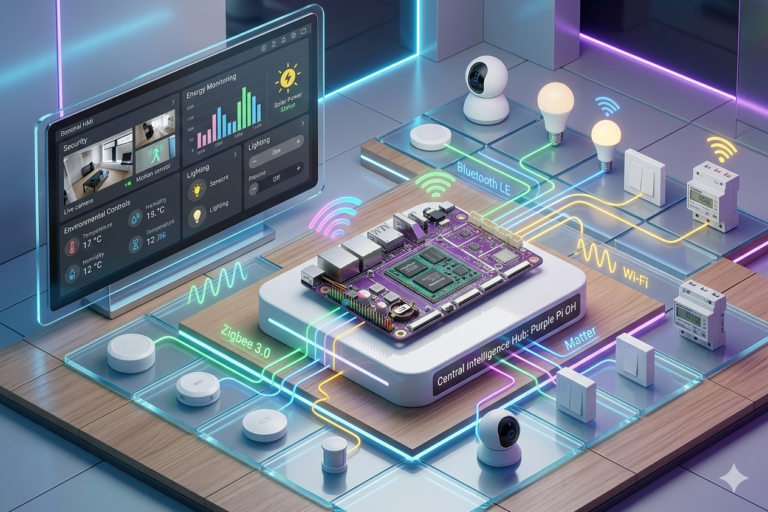
A Gateway is the brain that connects everything.
👉 It:
Translates protocols (Zigbee ↔ Wi-Fi ↔ Matter)
Controls automation
Connects all devices into one system
Without a gateway: ❌ Devices stay isolated ❌ You need multiple apps
With a gateway: ✅ Everything works together
Why Use Home Assistant?
Home Assistant is one of the most powerful smart home platforms today.
💡 Key Advantages
1. 🔗 All Devices in One Place
Supports Matter, Zigbee, Z-Wave, Wi-Fi
No need for 10 different apps
2. ⚡ Local Control (Very Important)
Works without internet
Faster response
More privacy
3. 💰 Saves Money Long-Term
No subscriptions
Works with cheaper devices
Avoid vendor lock-in
4. 🤖 Powerful Automation
Examples:
Lights turn on when you enter
AC adjusts automatically
Alerts when motion detected
Cost vs Value: Realistic View
What You Save
No cloud subscription fees
Buy affordable sensors instead of branded kits
Long-term investment
❌ What It Costs You
⏱ Time Investment
Setup takes time (learning curve)
Configuration & integrations
💻 Initial Hardware Cost
Mini PC / Raspberry Pi
Zigbee or Z-Wave USB dongle
👉 Example setup:
Raspberry Pi + Zigbee dongle + few sensors
Basic Setup
To start simple:
🧩 What You Need
A small computer (like Raspberry Pi or Purple Pi OH)
Install Home Assistant
Zigbee USB gateway
Few smart devices (lights, sensors)
🪄 First Automation Idea
Motion sensor → Turn ON light
Door sensor → Send alert
👉 Simple, useful, and impressive
Future of Smart Homes
Matter will dominate compatibility
Zigbee & Z-Wave will still power devices
Local AI + automation will grow
👉 Smart homes are moving toward:
“Fully automated, intelligent living spaces”
Final Thoughts
If you want a smart home that is powerful, flexible, and future-proof: